
Setting Up the Epson ColorWorks CW-C6000 Series for Peak Performance



What Can We Help You With?
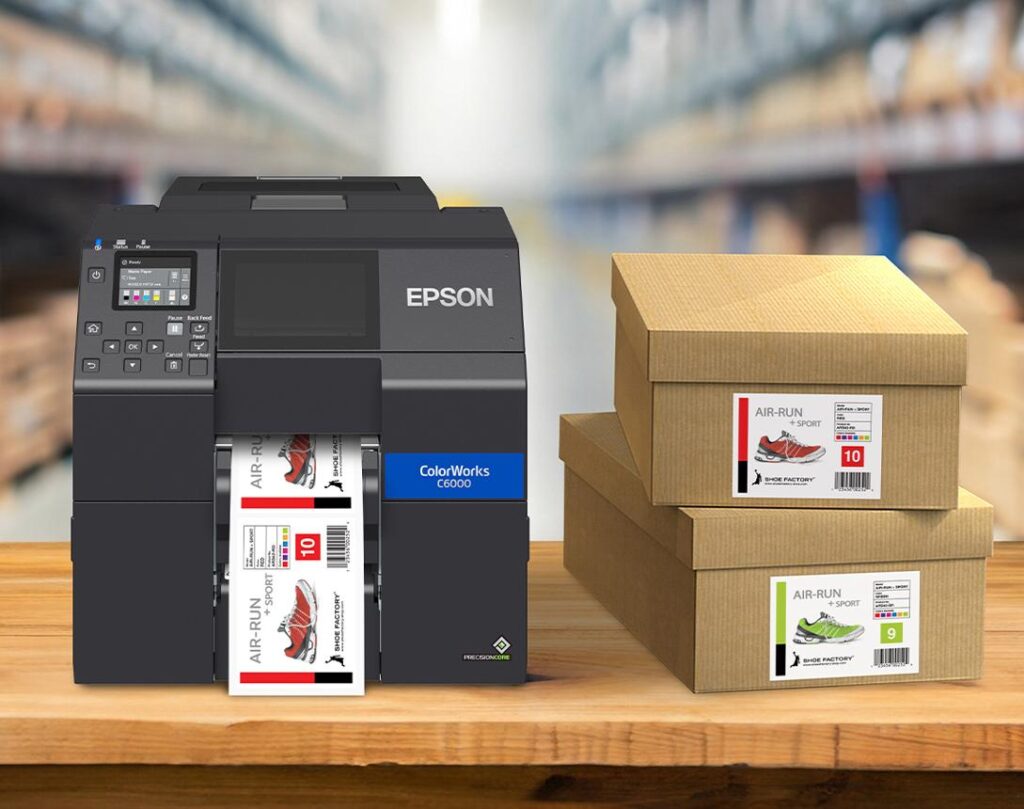
When your operation depends on high-quality, on-demand color labels, proper printer setup is everything. The Epson ColorWorks CW-C6000 Series was engineered specifically for mission-critical labeling applications where speed, durability, integration, and image quality matter most. Whether you are printing GHS labels, product branding labels, warehouse labels, compliance labels, or full-color shipping labels, the CW-C6000 series delivers industrial performance with the flexibility of on-demand color printing.
At PaladinID, we help companies not only select the right color labeling solution, but also configure their printers correctly from day one. In this guide, we’ll walk through the fundamentals of setting up the Epson C6000 printer, key features that improve workflow efficiency, and several tips and tricks that help maximize print quality and long-term reliability.
You can also pair this article with our setup and demonstration video for a complete walkthrough of installation, media loading, printer configuration, maintenance, and optimization tips.
Why the Epson CW-C6000 Stands Out
The Epson CW-C6000 series was designed as a direct upgrade from traditional black-and-white thermal transfer printers while offering full-color capabilities at a comparable operating cost.
Key advantages include:
- Full-color on-demand printing
- Print speeds up to 5 inches per second
- Up to 1200 x 1200 dpi print resolution for sharp text and barcodes
- Compatibility with ZPL II environments for easier integration
- Support for Windows®, Mac®, and Linux® systems
- Remote printer fleet management tools
- Durable pigment ink technology for long-lasting labels
The CW-C6000 series is available in both Auto Cutter and Peel-and-Present configurations, allowing businesses to tailor the printer to their production environment.
Step 1: Choose the Right Model for Your Workflow
Before setup begins, it’s important to select the correct printer configuration:
CW-C6000A – Auto Cutter
Ideal for:
- Batch printing
- Variable-length labels
- Product labeling
- Inventory and warehouse labels
The built-in auto cutter helps separate jobs automatically and reduces manual handling.
CW-C6000P – Peel-and-Present
Ideal for:
- Manual label application
- Faster operator workflows
- Semi-automated labeling environments
The integrated label-taking sensor pauses printing until the previous label is removed, improving efficiency and eliminating loose label loops.
Step 2: Proper Media Loading
One of the biggest setup mistakes is improper media loading and sensor alignment. The CW-C6000 supports:
- Die-cut labels
- Continuous labels
- Black mark media
- Fanfold labels
- Matte and gloss papers
- Synthetic label materials
Pro Tip:
Always verify:
- Media width settings
- Gap sensor positioning
- Black mark sensor alignment
- Media type selection in the driver
The adjustable gap sensor can be positioned from 0.4″ to 2.4″ from the left paper guide.
Using the correct media profile is critical to achieving:
- Crisp barcodes
- Proper ink curing
- Accurate color reproduction
- Reliable label feeding
At PaladinID, we strongly recommend using high-quality inkjet-coated label materials specifically designed for Epson ColorWorks printers.
Step 3: Install Drivers and Configure Connectivity
The CW-C6000 offers:
- USB 2.0 connectivity
- Gigabit Ethernet networking
The printer also supports:
- ZPL II emulation
- Epson ESC/Label
- SAP environments
- Major middleware platforms
Best Practice:
For production environments:
- Assign a static IP address
- Configure remote management tools
- Keep firmware updated
- Use network deployment utilities for multiple printers
Epson includes several powerful remote management utilities that allow IT teams to monitor supply levels, deploy firmware updates, and manage large printer fleets remotely.
Step 4: Optimize Print Quality Settings
The Epson PrecisionCore® TFP® printhead technology is capable of extremely high-resolution printing with excellent barcode clarity and vibrant color output.
Tips for Best Results:
- Use 1200 dpi mode for small text and high-density barcodes
- Use standard speed modes for general product labeling
- Match print mode to label material
- Use ICC color profiles when color accuracy is critical
For many industrial applications, 600 x 600 dpi provides the best balance of:
- Speed
- Ink usage
- Durability
- Image quality
Step 5: Perform Preventive Maintenance
The CW-C6000 was designed for demanding industrial environments and includes:
- Automatic head maintenance
- Nozzle verification technology
- Missing dot compensation
Even with these advanced features, routine maintenance is still important.
Maintenance Tips:
- Keep media dust away from the print path
- Clean sensors regularly
- Replace maintenance boxes when prompted
- Store media in climate-controlled conditions
- Use genuine Epson inks for optimal reliability
Routine maintenance dramatically improves:
- Print consistency
- Barcode readability
- Printer uptime
- Printhead longevity
Integration and Automation Advantages
One of the most powerful features of the CW-C6000 family is the General-Purpose I/O Port designed for automated workflows.
This allows integration with:
- Applicators
- Conveyor systems
- Automation equipment
- Production line controls
For businesses moving toward Industry 4.0 initiatives, this is a major advantage over many desktop color label printers.
Applications for the Epson CW-C6000
The Epson CW-C6000 series excels in:
- GHS chemical labels
- Food and beverage labels
- Medical and pharmaceutical labeling
- Product branding
- Warehouse and logistics labels
- Compliance labeling
- RFID companion labeling
- Cannabis and nutraceutical labeling
- Industrial identification labels
Because labels are printed on demand, companies eliminate:
- Large inventories of pre-printed labels
- Obsolete label waste
- Long lead times
- Changeover delays
Final Thoughts
The Epson ColorWorks CW-C6000 series combines industrial durability, exceptional print quality, and advanced workflow integration into one powerful color labeling platform. When properly configured, these printers can dramatically improve operational efficiency while delivering vibrant, durable labels exactly when you need them.
At PaladinID, we help companies configure complete color labeling solutions including:
- Epson ColorWorks printers
- Inkjet label materials
- GHS label solutions
- Custom label sizing
- Color matching assistance
- Workflow integration support
- Ongoing technical guidance
If one of our stock label materials does not meet your requirements, PaladinID can customize the size, shape, material, or adhesive your application requires.
Let’s Talk!
If you need help selecting or setting up the right Epson ColorWorks solution for your business, our team is here to help.
- Email us:
- Call: 888.972.5234
- Schedule a Discovery Call:
PaladinID delivers label solutions that stick!


Got Labeling Questions? Our AI Assistant Has Answers - Chat Now!
For more information on PaladinID
Get Help With Your Next Label Project
We have over 35 years of providing exceptional service and labeling products to the world. Take the first step to an easy, stress-free solution for your label needs by contacting us.
Schedule a call below or email dritchie@paladinid.com
Make Your Mark
“Making companies more competitive by offering the correct label printing solution, on time, within budget, while creating unmatched value”.
About PaladinID, LLC
PaladinID develops and supports high-performance barcode labeling applications. We work with our clients to “Make Your Mark” by providing the expertise and tools necessary to create an entire product label printing solution. Located in central New Hampshire, PaladinID has been serving Massachusetts, Vermont, Maine, Connecticut, Rhode Island, New England, and beyond for over 30 years, and in 2017, became an RFID-certified company. We look forward to working with you.
You may be interested in our other services:
Product Labels
Product Labels
Labels for every type of application: Blank, Pre-printed, Variable data
Label Printers
Label Printers
We sell and support: Direct/thermal transfer, Inkjet, Laser
Printer Ribbons
Printer Ribbons
We sell ribbons for ALL barcode printers including: Zebra, Datamax, Sato, Intermec
Flexible Packaging
Flexible Packaging
We offer a wide variety of packaging containers for your products.
Label Software
Label Software
Software for all barcode printing and product labeling.
Label applicators
Label Applicators
Wide selection of applicators: Desktop/Mobile, Applicator only, Print & apply
